
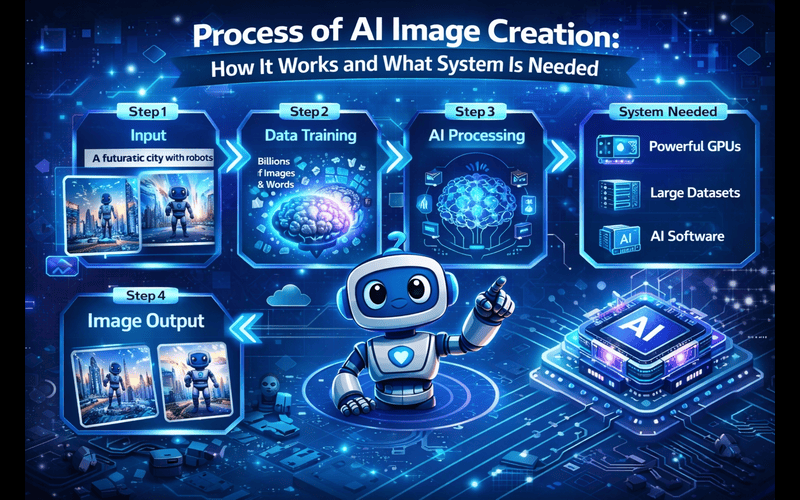
Artificial intelligence has transformed digital content creation, especially in the field of image generation. In 2026, AI image creation tools are widely used by bloggers, designers, marketers, developers, and website owners. What once required professional photography equipment or advanced graphic design software can now be done with a simple text prompt.
But how exactly does AI create images? What happens behind the scenes? And what kind of system or hardware is required for this process?
In this detailed guide, we explain the complete process of AI image creation, how the technology works, and what type of system is needed — whether you are using cloud-based tools or running models locally.
AI image creation refers to the process of generating images using machine learning models trained on large datasets of visual content. Instead of manually drawing or editing, users provide a text description (prompt), and the AI model generates a visual representation based on learned patterns.
For example:
“Modern office workspace with laptop and coffee in minimal style”
The AI system interprets this text and creates an image that matches the description.
Companies like OpenAI and Adobe have played major roles in advancing AI image technology, making it accessible to businesses and individuals.
AI image generation may look simple on the surface, but behind the scenes it involves multiple technical stages.
Before AI can generate images, it must be trained. During training:
For example, it learns that:
This training phase requires powerful computing infrastructure and large datasets.
When a user enters a prompt, the AI system:
The system converts the text into numerical representations that the model can process mathematically.
Most modern AI image systems use diffusion models or generative adversarial networks (GANs).
In simplified terms:
This process happens within seconds in cloud-based systems.
After generating the image, AI tools may:
However, generated images can be large in file size. Before uploading to a website, optimization is important.
Compress AI-generated images for faster website speed
Convert images to WebP format
Optimized images help improve SEO and page speed performance.
The required system depends on whether you are using cloud-based AI tools or running AI models locally.
Most users today rely on cloud platforms. In this case:
System Requirements:
Since heavy processing happens on remote servers, your local computer does not need advanced hardware.
Cloud-based AI is ideal for:
Running AI image models locally requires more powerful hardware.
Minimum Requirements:
High-end setups may include:
Local AI generation is typically used by:
AI-generated images can be used for:
Search engines such as Google prioritize user experience and page performance. While AI images themselves do not guarantee higher rankings, properly optimized visuals contribute to:
For official image SEO guidance: visit
AI tools reduce dependency on stock photography and allow unique content creation.
Despite its advantages, AI image creation has limitations:
Responsible usage is important for long-term sustainability.
AI image generation continues to evolve rapidly. Future trends may include:
As computing power increases and algorithms improve, AI image creation will become even more accessible.
If you plan to use AI-generated images:
Performance and transparency remain key factors in digital success.
The process of AI image creation involves advanced machine learning models trained on massive datasets. Through text-to-image conversion and diffusion techniques, AI systems generate visuals from simple prompts within seconds.
For most users, cloud-based tools require only a standard laptop and internet connection. However, running AI models locally demands powerful GPUs, high RAM, and technical expertise.
AI image creation offers speed, creativity, and scalability — but also requires careful optimization and responsible use. When combined with proper compression and format conversion, AI-generated images can support strong website performance and user engagement.
In 2026, understanding how AI image generation works is not just for developers — it is becoming essential knowledge for website owners and digital creators.



PicsCorp is your go-to online tool for quick and powerful image editing and compression. Enhance, resize, and optimize your photos effortlessly — all in one place, without losing quality.
Add a Comment