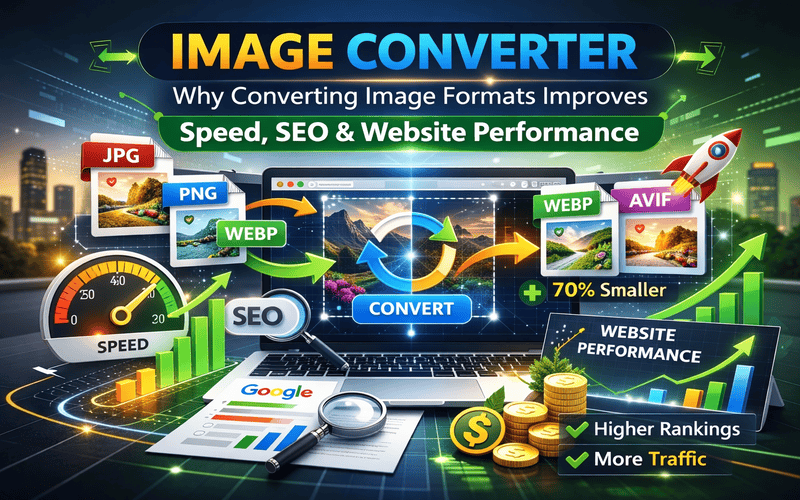
In 2026, image format optimization has become a critical part of website performance strategy. Whether you run a blog, an e-commerce store, a photography portfolio, or a SaaS platform, using the correct image format directly affects loading speed, search engine rankings, and user experience.
Many website owners upload images without considering format compatibility. A large PNG file might look perfect, but it could silently slow down your website and hurt conversions. That is where an image converter becomes essential.
Search engines like Google prioritize fast-loading pages, especially for users in competitive regions like the United States, United Kingdom, Canada, and Europe. Converting images into modern formats such as WebP or AVIF can significantly improve Core Web Vitals and overall site performance.
In this complete guide, we will explain what an image converter is, why it matters for SEO, and how it improves website performance and revenue potential.
An image converter is a tool that changes an image file from one format to another without significantly affecting visual quality. For example:
Different formats serve different purposes. Some prioritize quality, while others focus on compression efficiency and loading speed.
Convert images online instantly
An online image converter eliminates the need for heavy desktop software and allows instant format changes directly in the browser.
Many website owners underestimate how much image format affects SEO. However, image size and format directly impact page speed, and page speed is a ranking factor.
According to official guidance from: Google developers
Search engines evaluate performance signals such as:
Older formats like uncompressed PNG or large JPEG files increase page weight. Modern formats like WebP and AVIF reduce file size without visible quality loss.
When images load faster:
This is especially important for businesses targeting high-competition markets in North America and Europe.
Understanding formats helps you choose the best one for your website.
Best for:
Advantages:
Limitation:
Best for:
Advantages:
Limitation:
Developed by Google, WebP offers:
WebP is widely recommended for modern websites.
AVIF is one of the newest formats offering even better compression than WebP. While browser support continues to expand, it is becoming increasingly popular in performance-focused websites.
Speed matters more than ever in 2026. Users expect instant loading, especially on mobile devices.
Converting images from PNG to WebP, for example, can reduce file size by 30–70% without visible quality difference.
Smaller files mean:
For technical performance metrics,
Improved performance leads to higher search visibility and better user satisfaction.
If your website monetizes through advertising platforms such as Google AdSense, speed directly impacts earnings.
Faster websites:
When visitors stay longer, ad impressions increase. That often leads to improved RPM and overall revenue.
Optimized image formats contribute indirectly but significantly to ad performance.
Online stores rely heavily on product images. However, high-quality images can increase loading time if not optimized properly.
Converting product images to WebP or optimized JPEG can:
In competitive markets like the USA and UK, even small speed improvements can increase conversions noticeably.
Many users confuse conversion with compression, but they serve different purposes.
ToolPurposeImage ConverterChanges format (JPG to WebP, etc.)Image CompressorReduces file sizeImage CropperAdjusts framing
For best results, combine all three techniques before publishing.
Compress your images for faster performance Picscorp compress
Crop images for better visual focus Picscorp crop image
Together, these tools maximize optimization.
For blogs → WebP
For logos → PNG
For product photography → WebP or optimized JPG
Do not choose extreme compression levels that reduce clarity. Balance quality and file size.
Common Image Conversion Mistakes:-
Avoid these common errors:
Conversion should improve performance, not degrade image clarity.
Modern online tools provide:
For freelancers, bloggers, and small businesses, browser-based tools are more practical than heavy software programs.
They also reduce workflow complexity, saving valuable time.
Social platforms often recompress uploaded images. By converting images to optimal formats before uploading, you maintain better quality control.
Correct formatting prevents distortion and maintains branding consistency.
For official social media guidelines,
Properly formatted images improve engagement rates and visual presentation.
As internet speeds improve globally, expectations rise. However, performance optimization remains critical because:
WebP and AVIF are expected to become even more dominant across websites targeting Western markets.
Early adoption gives websites a competitive advantage.
In 2026, image conversion is not just a technical adjustment — it is a performance strategy. Converting images to modern formats improves speed, enhances SEO, supports better user experience, and increases revenue potential.
For websites targeting the USA, UK, Canada, and Europe, performance standards are high. Using the right image format helps you stay competitive and meet user expectations.
Combine format conversion with compression and cropping to achieve maximum optimization.
Small improvements in image handling can create significant long-term growth in traffic, rankings, and conversions.
Start converting smarter — and let your website load faster than ever.


PicsCorp is your go-to online tool for quick and powerful image editing and compression. Enhance, resize, and optimize your photos effortlessly — all in one place, without losing quality.
Add a Comment